
Zoom vs. LMS Knowledge Check
Answer the following questions to determine if you understand when to use Zoom versus a dedicated Learning Management System (LMS).
You’ve probably heard someone say, "We’re moving our training to Zoom," or maybe you’ve been asked to upload your course materials to a Zoom link. It’s confusing, right? Is Zoom actually an eLearning platform, or is it just a fancy phone call with video? The short answer is no. Zoom is not an eLearning platform in the traditional sense. But that doesn’t mean it can’t play a huge role in how we learn today.
Here’s the thing: most people mix up synchronous communication tools with learning management systems. They look similar because they both happen on a computer screen. But their jobs are totally different. If you’re trying to build an online course, run a corporate training program, or just figure out where your homework lives, knowing the difference saves you headaches and money.
The Core Difference: Communication vs. Management
Think of Zoom as a digital conference room. Its primary job is real-time interaction. You log in, you see faces, you talk, you share your screen, and then you leave. Once the meeting ends, the content often disappears unless you specifically recorded it. There’s no place to store assignments, track who passed a quiz, or issue a certificate automatically.
An eLearning platform, often called a Learning Management System (LMS), is more like a university campus. It has classrooms (courses), libraries (resource repositories), testing centers (quizzes), and administrative offices (grade books). Examples include Canvas, Moodle, Blackboard, or Teachable. These systems are built to manage the *lifecycle* of learning, not just the moment of connection.
| Feature | Zoom | eLearning Platform (LMS) |
|---|---|---|
| Primary Function | Live video/audio communication | Content delivery, tracking, assessment |
| Content Storage | Limited (Cloud recordings only) | Extensive (Files, videos, modules) |
| Student Tracking | Attendance reports only | Progress, grades, completion rates |
| Interactivity | Real-time chat, polls, breakout rooms | Discussion boards, quizzes, self-paced modules |
| Best For | Webinars, live classes, meetings | Full courses, certifications, blended learning |
Why People Confuse Them
The confusion comes from the fact that modern education blends these tools. A typical online class might use Zoom for Tuesday evening lectures and an LMS for everything else. Students log into the LMS to watch pre-recorded videos, submit essays, and take exams. Then, at 7 PM, they click a Zoom link to discuss what they learned.
Because students interact with both daily, it feels like one system. But if you tried to run a full semester course entirely on Zoom, you’d hit a wall fast. How do you grade 50 students’ essays? Where do you keep the syllabus so everyone can find it next week? How do you ensure a student watched Module 3 before accessing Module 4? Zoom simply wasn’t designed for those structural tasks.
When Zoom Acts Like an eLearning Tool
That said, Zoom has evolved. It’s not just a video chat app anymore. Features like Zoom Learning (formerly Zoom Events) allow organizations to host multi-day conferences, sell tickets, and provide on-demand replays. This blurs the line.
If you’re running a workshop series, Zoom can handle registration, payment, and access control. You can even add simple quizzes using third-party integrations. In this narrow context, Zoom acts as a lightweight eLearning solution. But it lacks depth. You won’t find robust analytics on learner behavior, such as which part of a video they re-watched or how long they spent on a specific page.
Consider a scenario: You teach a three-week coding bootcamp. Weeks 1 and 2 involve live pair-programming sessions via Zoom Breakout Rooms. Week 3 requires students to build a project and submit code files. If you try to manage this solely through Zoom, you’ll end up emailing links back and forth, losing track of submissions, and manually grading each file. An LMS automates that flow.
The Hybrid Model: Using Both Together
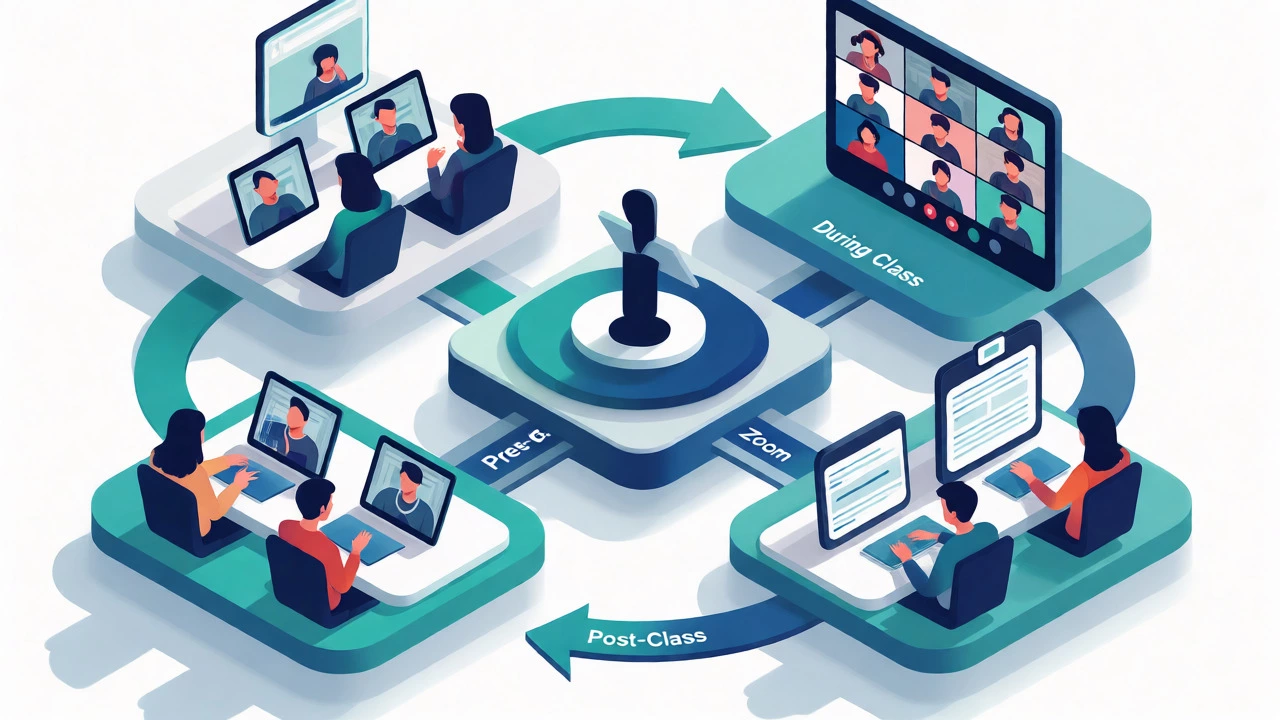
Most successful online educators don’t choose between Zoom and an LMS; they integrate them. This hybrid approach leverages the strengths of each tool. Here’s how it typically works:
- Pre-Class: Students access readings and introductory videos on the LMS. The LMS tracks who completed the prep work.
- During Class: Everyone joins a Zoom session for live discussion, Q&A, or group activities. The LMS provides the Zoom link automatically.
- Post-Class: Recordings are posted back to the LMS. Assignments are submitted through the LMS gradebook. Feedback is given via LMS comments.
This setup keeps the energy high during live sessions while maintaining organization outside of them. Tools like Canvas or Moodle have built-in plugins that sync Zoom meetings directly into the course calendar. When a teacher creates a meeting in Canvas, it appears as a clickable link in the student’s dashboard. No copy-pasting required.
Cost Implications for Educators
Budget matters. If you’re a solo creator selling mini-courses, paying for both a premium Zoom account and a separate LMS subscription might feel heavy. Zoom Pro costs around $15-$20 per month per user. Basic LMS platforms like Thinkific or Teachable start around $39-$50 per month but often offer free tiers.
However, hidden costs emerge when you rely too heavily on Zoom for structure. Time spent manually organizing files, chasing down missed assignments, and answering repetitive questions adds up. An LMS automates these processes. If your time is worth $50 an hour, saving two hours a week by using an LMS pays for itself quickly.
For large institutions, the cost model shifts. Universities often license enterprise-grade LMS solutions and bulk Zoom contracts. They value the integration features and security compliance more than individual price tags. For small businesses, simplicity wins. Sometimes, a simple website with embedded Zoom links and PDF downloads is enough. You don’t always need a full-blown LMS if your course is short and interactive.

Security and Data Privacy Concerns
Another factor people overlook is data handling. When you use Zoom for teaching, student data-names, emails, attendance logs-resides on Zoom’s servers. With an LMS, you often have more control over where that data sits, especially if you self-host open-source options like Moodle.
GDPR and other privacy regulations require clear consent forms for recording students. Zoom makes this easy with pop-up notifications. But storing long-term academic records? That’s better suited for an LMS with robust backup and export features. If Zoom changes its pricing or terms tomorrow, migrating your entire curriculum is hard. Moving data out of an LMS is usually straightforward because standards like SCORM and xAPI exist specifically for interoperability.
How to Decide What You Need
Ask yourself these three questions to figure out if you need an eLearning platform beyond Zoom:
- Do I need to track progress? If yes, you need an LMS. Zoom tells you who showed up, not who understood the material.
- Is my content self-paced? If students learn at their own speed, an LMS is essential. Zoom forces everyone to move together in real-time.
- Do I need assessments? Quizzes, final exams, and certification generation are native LMS features. Doing this in Zoom requires awkward workarounds.
If you answered "no" to all three, Zoom alone might suffice. Maybe you’re hosting weekly book clubs or informal masterminds. Those thrive on conversation, not metrics. But if you’re building a scalable educational product, relying solely on Zoom limits your growth.
Final Thoughts
So, is Zoom an eLearning platform? Technically, no. It’s a communication tool that supports eLearning. Calling it an eLearning platform is like calling a microphone a concert hall. One helps you be heard; the other provides the space, seats, and stage for the performance.
Use Zoom for connection. Use an LMS for structure. Combine them, and you get the best of both worlds: human interaction backed by organized, measurable learning outcomes. Don’t let the interface fool you-the magic happens in how you orchestrate these tools, not just in clicking a join button.
Can I sell courses directly on Zoom?
Yes, through Zoom Events and Zoom Apps, you can sell tickets to webinars and workshops. However, it does not support complex course structures, drip-fed content, or detailed student progress tracking like dedicated eLearning platforms do.
What is the best alternative to Zoom for education?
Microsoft Teams and Google Meet are direct competitors for video conferencing. For full eLearning capabilities, alternatives include Canvas, Moodle, Blackboard, and newer platforms like Kajabi or Teachable, which combine hosting with marketing tools.
Does Zoom save chat history?
Zoom can save chat transcripts if enabled by the host. However, unlike an LMS discussion board, these chats are tied to a specific meeting instance and are not easily searchable across a whole course or term without manual export and organization.
Is Zoom secure enough for student data?
Zoom uses end-to-end encryption for paid plans and complies with major standards like FERPA and GDPR. However, for long-term storage of sensitive academic records, many institutions prefer LMS providers with specialized data retention policies and local server options.
Can I integrate Zoom with an LMS?
Absolutely. Most major LMS platforms have native Zoom integrations. This allows instructors to schedule meetings directly within the course shell, auto-post links to students, and import attendance records back into the gradebook.